Morph Unit
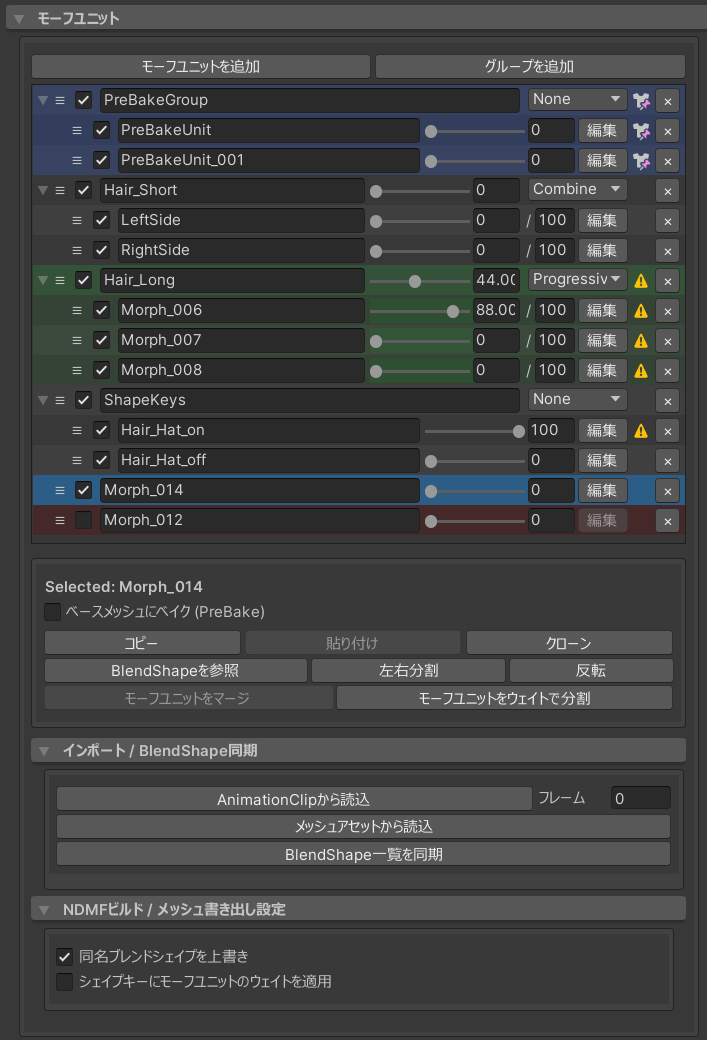
TreeView 操作
Morph Unit 與群組會顯示在 TreeView 中,可像操作 Hierarchy 一樣進行單選、多選與 Drag & Drop。
-
藍色背景
指定為 Prebake 的 Morph Unit/群組
-
綠色背景
Merge Group 正在預覽
-
紅色背景
頂點數與目前指定的目標 Mesh 不同的 Morph Unit
Morph Unit

啟用/停用檢查
啟用或停用 Morph Unit/群組。停用後,即使 Weight 改變也不會套用,亦不會寫入 Base Mesh 或 Shape Key。
名稱
此處設定的名稱會成為 Export 時的 BlendShape 名稱。
Weight(0–100)
調整 Morph Unit 的 Weight。進入 Edit Mode 時,此 Morph Unit 的 Weight 會設為 100,其餘設為 0。
啟用保留其他 Weight後,進入 Edit Mode 時會保留其他 Morph Unit 的 Weight;離開 Edit Mode 後會恢復原值。
警告標記⚠️
在以下情況下,Morph Unit 群組上將顯示警告標記。
- Morph Unit 未指定為 Bake 對象
- Weight 大於 0
- 當停用「將 Morph Unit Weight 套用至 Shape Key」選項時
通常,寫入 Shape Key 的 Morph Unit 會以 Weight 0 輸出;若某個 Morph Unit/群組在 Export Mesh 時會因 Weight 改變外觀,系統便以「⚠️」提示。
準確來說,這裡指的是 SkinnedMeshRenderer 的 BlendShapeWeight;若該 Index 的 Weight 曾被修改,數值可能不是 0。
為避免意外變形,建議消除警告後再 Upload。
刪除(✕標記)
刪除 Morph Unit。
Morph Unit 群組
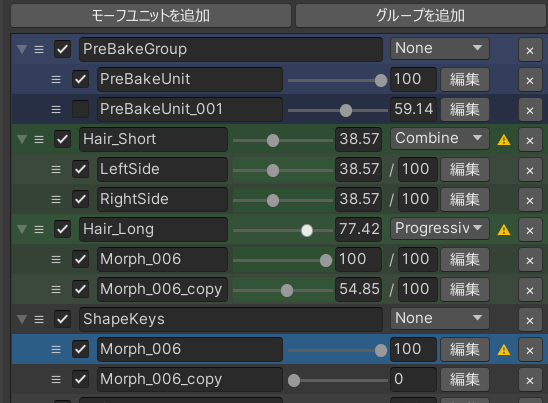
可把 Morph Unit 加入群組,以便集中管理。
合併模式
群組可以設定為合併模式。
預設值為 None,此時群組只作為 Folder 使用。選擇其他 Merge Mode 後,群組內的 Morph Unit 會依群組名稱合併成一個 Shape Key。
Progressive 和 Crossfade 可以使用每個 Morph Unit 作為鍵來控制。
調整任一 Morph Unit 的 Weight 時,Group 內其他 Morph Unit 的 Weight 會依模式同步變化,方便預覽 Merge 後的行為。
在預覽期間,該群組綠色的將被覆蓋
None
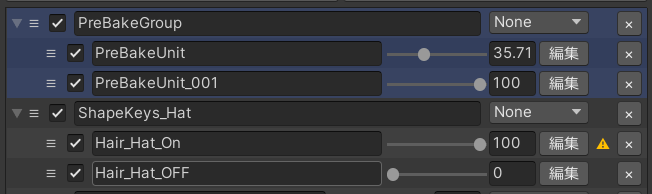
不合併 Morph Unit,只作為 Folder 管理;也可把整個群組指定為 Prebake。
Combine
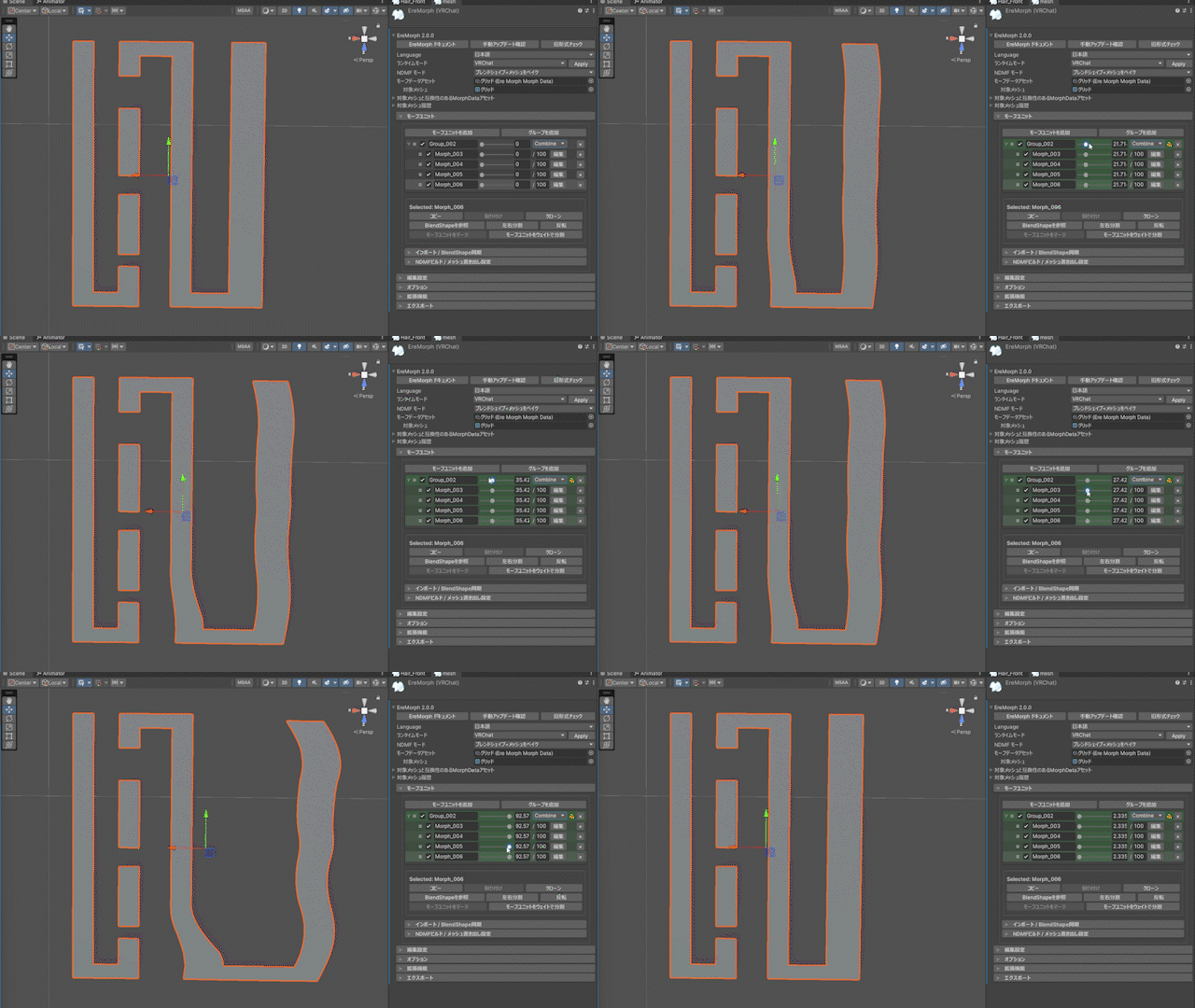
這是所有子 Morph Unit 同時移動到 0 > 100 時的行為。
這相當於一般的 Morph Unit Merge 功能。
Progressive
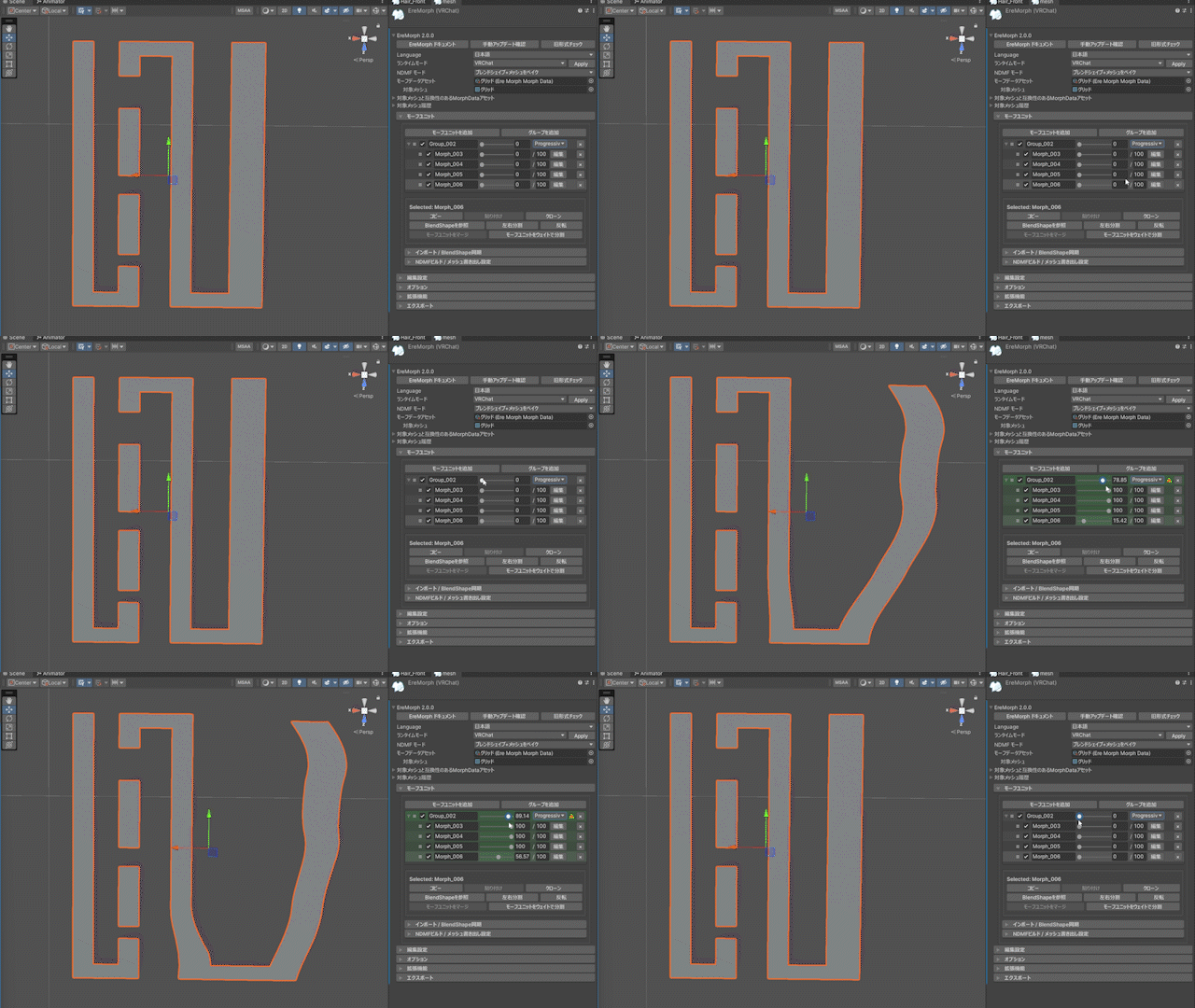
這是將子 Morph Unit 從頂部順序移動到 0 > 100 時的行為。
Crossfade
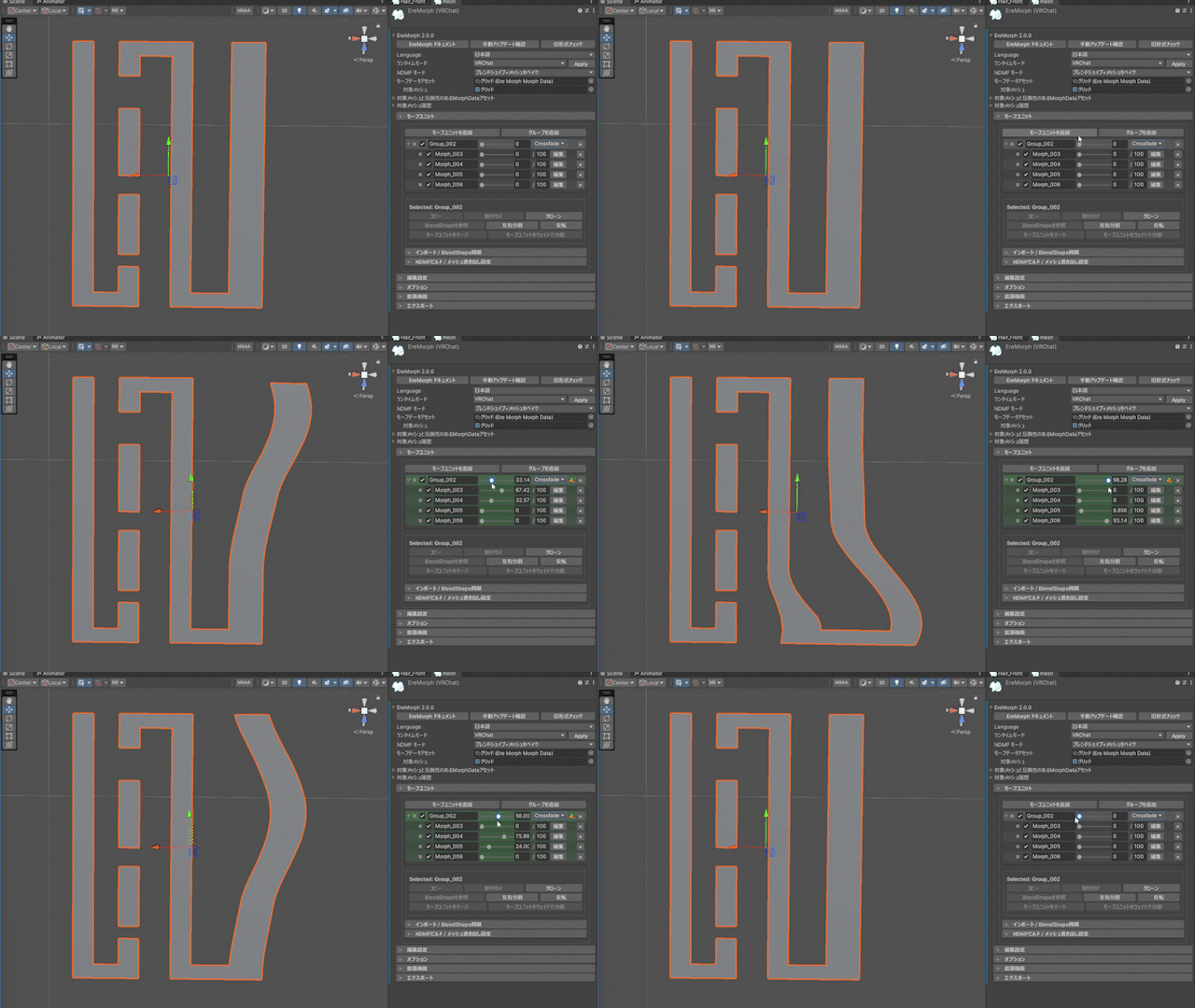
這是按從頂部到 0 > 100 > 0 的順序移動子 Morph Unit 時的行為。
建立 In-Between Shape Key 時,通常建議使用此模式。
Weight Limit
設定合併模式後,每個 Morph Unit 旁邊將顯示一個數字輸入欄位。
此設定將 Morph Unit 的最大值變更為該值。
合併點
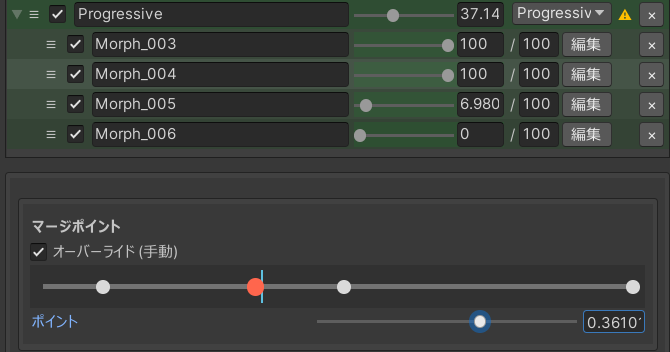
當合併模式為 Progressive 或 Crossfade 並且選擇了群組或群組內的 Morph Unit 時顯示。
如果群組是嵌套的,則每個群組對應的點將單獨顯示。
當您選擇每個點/Morph Unit 時,將選擇對應的點/Morph Unit。
透過改變該點的位置,您可以調整每個 Morph Unit 的權重達到 100 的時間。
選擇操作面板
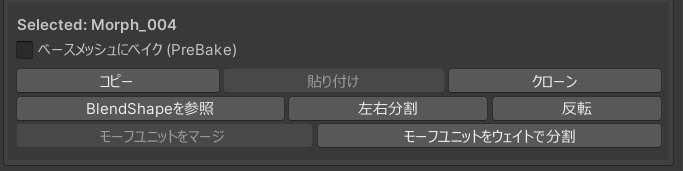
Bake 至 Base Mesh (Prebake)
指定的 Morph Unit/群組不會寫入 Shape Key,而會直接 Bake 至 Base Mesh。
可指定單一 Morph Unit 或整個群組;指定後會以藍色背景顯示。
複製/貼上
複製/貼上 Morph Unit 的頂點運動資訊。
如果頂點數量匹配,也可以從其他 Mesh 的EreMorph複製。
複製
克隆 Morph Unit 群組。
參考 BlendShape
參考現有 BlendShape,並 Import 為 Morph Unit;名稱會沿用 Import 的 Shape Key 名稱。
左右分割
將 Morph Unit 分成左右兩部分,並用[_L][_R]建立一個新的 Morph Unit。
原始 Morph Unit 仍處於停用狀態。
反轉
反轉 Morph Unit 的頂點運動。
合併 Morph Unit
透過合併多個選定的 Morph Unit 來建立單一 Morph Unit。
合併時,合併 Morph Unit 的權重參考目前值。
原始 Morph Unit 仍處於停用狀態。
按 Weight 分割 Morph Unit
依目前 Weight 把 Morph Unit 分成兩個。例如 Weight 為 40 時,會建立 0–40 與 40–100 兩段 Morph Unit。
Progressive/Crossfade 轉換
轉換選定的變形組 Progressive 和 Crossfade,同時保持其移動。
Import/BlendShape 同步
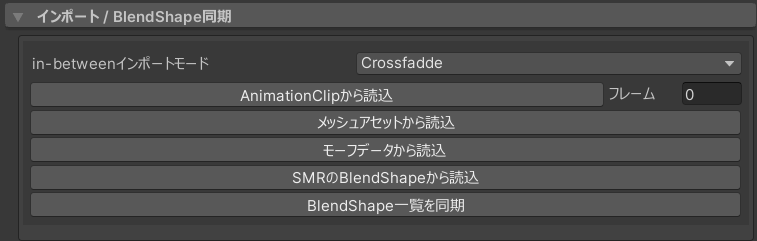
In-Between Import Mode
設定 Import 多個 Shape Key 之間資料時所使用的模式。
從 AnimationClip 讀取
指定 Frame 並載入 AnimationClip 後,若該 Clip/Frame 使用的 Shape Key 存在於 Target Mesh,系統會把當時的 Weight 設為 Limit Weight,並以停用群組載入 Morph Unit 清單。
從 Mesh Asset 載入
您可以載入外部 Export 的 Mesh Asset 並將 Shape Key Import 至 Morph Unit。
從變形資料載入
您可以載入其他 Morph Data Asset 並 Import 變形資料。
從SMR BlendShape 讀取
將目前 BlendShape 的值載入到 Morph Unit 清單中作為停用群組。
這在透過直接更改 BlendShape 而不是使用 AnimationClip 來建立表情時非常有用。
同步 BlendShape 清單
更新 Edit Mesh 的 BlendShape 清單,暫時加入目前的 Morph Unit。需要先讓其他工具選取這些 BlendShape 時可使用此功能。
此更新僅新增名稱。新增的 Shape Key 不包含任何變形資料
此添加是臨時的。當 Edit Mesh 被破壞(例如透過重新啟動編輯器)時,它會消失。
NDMF Build/Mesh Export 設定
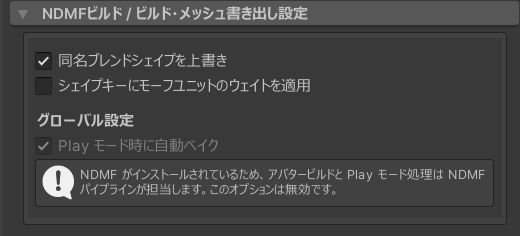
用相同的名稱覆蓋 BlendShape
覆蓋任何同名的 BlendShape。
當您想要編輯並覆蓋原始 Shape Key 時可以使用它。
如果停用時存在同名的 BlendShape,則會使用連續的編號建立它們。
將 Morph Unit Weight 應用於 Shape Key
一般情況下,寫入 Shape Key 時 Morph Unit 的 Weight 為 0。
正確的是,它指的是 SkinnedMeshRenderer 的 BlendShapeWeight,因此如果該指數的權重過去已更改,則它可能不會為 0。
啟用此選項將在寫入 Shape Key 時套用 Morph Unit 的權重值。
啟用此選項後,將不再顯示警告標記「⚠️」。
Play Mode 自動 Bake
如果未安裝 NDMF,則可以使用此設定。
未安裝 NDMF 時,EreMorph 的 Build Processor 會在進入 Play Mode 或 Scene Build 時自動 Bake 並指派 Mesh。